
Toll Box for commercial lorries
Pay tolls automatically with the right Toll Box for your journey
Including
- Including mounting bracket
Available countries
The Toll Box is already activated on receipt and ready for immediate use.
Fitting our Toll Box is simple and straightforward.
Fit the toll device to the windscreen mount supplied.
The windscreen must be cleaned before attaching the device.
Remove the protective film from the adhesive surface of the mount.
Press the adhesive surface firmly into the position shown in the picture on the windscreen. Done.
:quality(75))
Important installation instructions
If your vehicle has a coated windscreen, it must be fitted in an area that is not covered by the coating. This area should be marked in your vehicle manual
Questions about the truck toll device
How do I install the truck toll box?
To ensure that your toll device can be read and evaluated everywhere without any problems, it is important that it is mounted correctly. That's why we keep the installation of our truck toll box simple and straightforward. We will show you how it works quickly and safely:
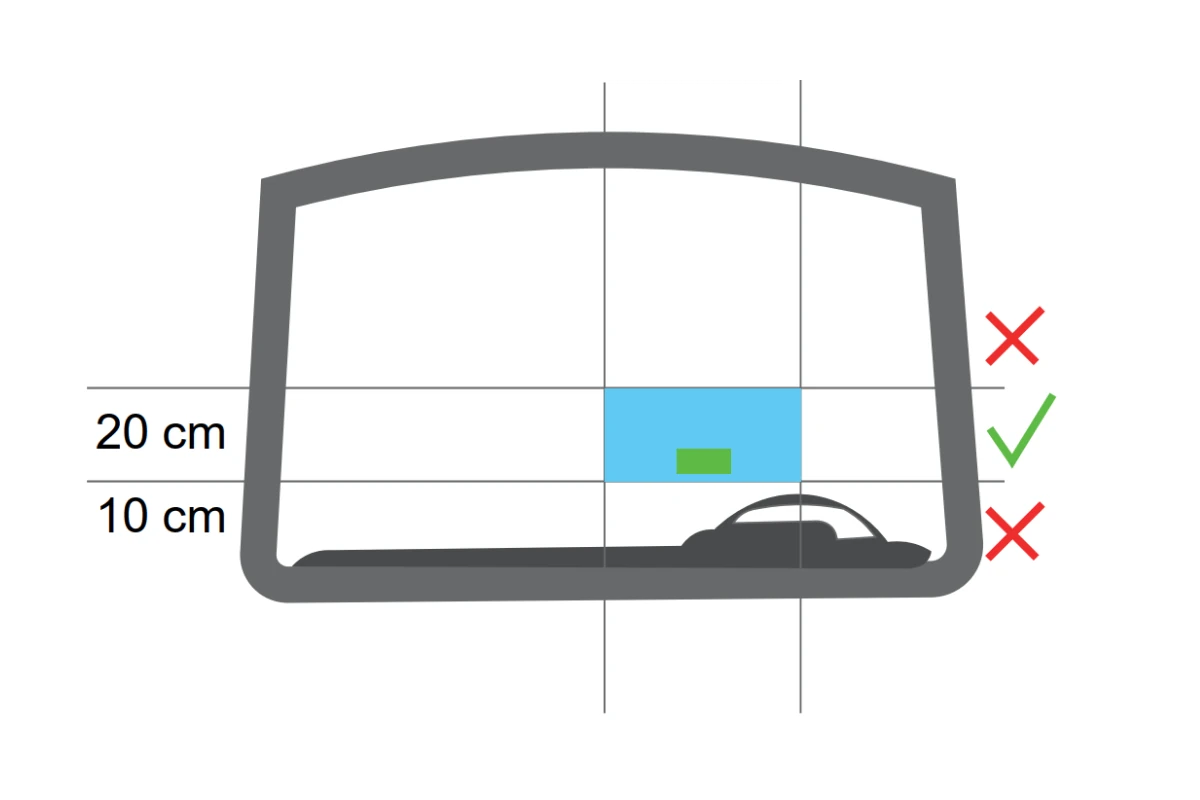 Mounting the truck toll box
Step 1: Mount the toll device on the supplied windscreen holder.
Step 2: Before attaching the device, the windscreen must be cleaned.
Step 3: Remove the protective film from the adhesive surface of the holder.
Step 4: Press the adhesive surface with a little pressure to the position shown above in the windscreen*. Done.
☛ Please note!*
If your vehicle has a coated windshield, the attachment must be made in an area that is excluded from the coating. This area should be marked in your vehicle manual.
Axle configuration: Can I adjust the number of axles?
At many toll stations across Europe, the toll charge is determined by the number of axles. If you drive routes with and without a semi-trailer, you naturally don’t have to pay any more than you need to. You can adjust the number of axles using the button on the Toll Box. This makes it easy to adjust the axle count, so you can carry on your journey – without wasting time or money.
Changing vehicles: Can I use my lorry toll device in another vehicle?
It is not possible to switch vehicles when using a lorry Toll Box, as the lorry toll device from maut1.de is personalised for a specific vehicle.
How the maut1.de Toll Box for Italy works
Order an online Toll Box
Order our Toll Box for your trip from home.
Install Toll Box
Attach the Toll Box to your vehicle according to the instructions.
Free Ride
Use the lanes specifically designated for Toll Boxes at the toll station.
Billing via email
We deduct the toll fees from your deposited billing account (monthly). You will receive an overview of the calculated fees by email.